

Designing invitations for events, celebrations, or business occasions is now much easier thanks to modern AI tools. Whether you need a wedding invite, birthday card, corporate event flyer, or digital invitation, platforms like Design.com, Canva, and Adobe Express make the process quick and straightforward.
In this comparison, we will examine how these three platforms perform in terms of design quality, ease of use, AI tools, and print-ready options. This will help you decide which solution works best for you, with Design.com being the top choice.
Invitation Design Platforms Overview
From quick drag-and-drop editing to helpful AI customization, each tool has its own strengths. If speed, creativity, or branding consistency is important to you, knowing these differences will guide you in choosing the right platform.
Key Highlights:
- Speed: Quickly create invitations with ready-made templates.
- Creativity: Customize fonts, colors, icons, and layouts.
- Branding consistency: Maintain a unified look across all event assets.
- Ease of use: Platforms cater to beginners and professionals alike.
- AI assistance: Tools help generate ideas, layouts, and content automatically.
Design.com
Design.com is a leading AI-powered design platform that helps you create high-quality invitations quickly. It offers professional templates, AI editing, and print-ready outputs for both personal and business events.
Strengths
- AI invitation generator: Create custom invitations in minutes.
- Template library: Hundreds of thousands of invitation templates for weddings, birthdays, parties, and corporate events.
- Customization: Edit text, fonts, colors, icons, and layouts easily.
- Professional quality: Invitations designed by expert designers with exclusive assets.
- Print-ready formats: Export in PDF, PNG, JPG, GIF, or MP4 for digital or physical use.
- Branding consistency: Match invitations with logos, flyers, and other event materials.
- Event assets: Also create RSVP cards, save-the-date, and digital invites.
- AI editing tools: Chat-based editing lets you refine designs quickly.
- Ease of use: Beginner-friendly, with no design skills required.
- Free Tier: Access 100% free logos, plus create websites, bio link pages, and digital cards at no cost; payment required to download designs from over 50 tools.
Weaknesses
- It might feel lighter than enterprise-level tools, but it’s perfect for small teams that want to work together without any problems.
- There’s no native app yet, but the browser experience is fast and responsive across devices.
Invitation Design Examples
Birthday

Wedding

Holiday

Design.com is a full branding solution, not just a design tool. It provides integrated features for creating websites, business cards, invitations, and social media assets, all in one platform.
Canva
Canva is a well-known design platform recognized for its simple interface and fast creation tools. It is perfect for users who want quick and easy invitations without any design experience.
Strengths
- Template variety: Thousands of invitation templates for all occasions.
- Drag-and-drop editor: Offers a straightforward and intuitive design experience.
- AI tools: Quickly generate text, images, and layouts.
- Asset library: Millions of photos, icons, and fonts at your disposal.
- Collaboration: Teams can edit designs together in real time.
- Multi-use platform: Create social posts, flyers, and presentations.
- Ease of use: Very beginner-friendly interface.
- Free Tier: Access basic templates and design tools for free.
Weaknesses
- Limited advanced customization.
- Basic branding tools.
- Some premium assets require payment.
Invitation Design Examples

Canva is a good choice for quick and simple invitation design. However, it provides less advanced customization and branding control compared to more powerful platforms.
Adobe Express
Adobe Express is a simple design tool that offers professional templates and straightforward editing tools. It is best for users wanting polished invitations with little effort.
Strengths
- Professional templates: High-quality designs for invitations and events.
- Clean interface: Simple yet structured editing experience.
- Customization: Easy control over text, colors, and images.
- Print-ready files: Export in PDF, PNG, and JPG formats.
- Adobe integration: Works well with other Adobe tools.
- Cross-platform use: Available both on desktop and mobile.
- Free Tier: Includes basic templates and editing tools.
Weaknesses
- Limited AI features.
- Fewer templates than competitors.
- Less flexibility in customization.
Invitation Design Examples
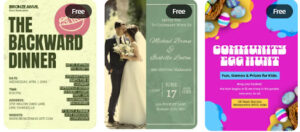
Adobe Express suits users who want clean and professional results quickly. However, it is less flexible and not as driven by AI compared to more advanced platforms.
Feature Comparison
| Features | Design.com | Canva | Adobe Express |
| Template Library | Extensive (hundreds of thousands) | Large variety | Professional templates |
| AI Tools | Advanced AI generation & editing | AI content tools | Basic AI tools |
| Customization | Deep AI customization | Moderate | Moderate |
| Ease of Use | Easy + powerful | Very easy | Easy |
| Print-Ready Files | PDF, PNG, JPG | PDF, PNG, JPG | PDF, PNG, JPG |
| Branding Features | Full branding suite | Basic branding | Adobe ecosystem integration |
| Collaboration | Limited | Strong | Moderate |
| Free Tier | Yes (logos & basic tools) | Yes | Yes |
| Commercial Use | Yes, fully safe & verified | Yes (license depends on assets) | Yes |
| Best For | Professional invitations & branding | Quick designs | Polished, simple designs |
Final Choice
For creating invitations that are visually impressive and ready for print, Design.com is the best option. Its mix of AI tools, large template library, and complete branding features makes it the most thorough solution.
If you want a platform that provides high-quality invitations with flexibility, scalability, and ease of use, Design.com is the top choice. It offers everything you need to create invitations easily.